Not so long ago we reported that the project maintain Linux versions of popular proprietary messenger Viber suddenly “alive.” But the joy, apparently, was premature: in the first update the developers made a mistake where the program asks to install the presence of at least 320 gigabytes of free space on the hard drive! This, thank God, recovering, and we’re going to tell you how.
In fact, Viber’u need 320 MB. The programmers responsible for the version of the software for GNU/Linux, most likely, made a mistake putting the wrong size value directly in the deb package. For this to be updated on some distros is almost impossible, unless you have a truly gigantic drive memory.

After uninstalling Viber will be released 328 GB
Please note! I have Ubuntu Studio 19.04, for example, Viber and even swears on a dependency conflict, however, runs as from the menu and via command in terminal. At the same time, the package Manager continuously and strongly recommends to remove Viber, while the application is running; the command “apt install-f” does not solve the problem, but aggravates by removing operable, in General, Viber.
The problem can be solved if to correct erroneous figures. For this, first things first, you need to download deb package Viber’and on the official website of the developer:
wget https://download.cdn.viber.com/cdn/desktop/Linux/viber.deb

Download Viber
After the package will be in your home directory, create it in the same directory, where it will be temporarily stored contents of the downloaded file:
cd ~ && mkdir viber-temp
Now let’s unpack the package into the newly created directory:
dpkg-deb -R ./viber.deb ./viber-temp
Now go to directory “DEBIAN” created directory “viber-temp” and display its contents on screen:
cd viber-temp/DEBIAN/ && ls
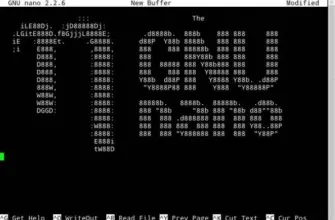
We are interested in the file “control” — this is where the developers made a mistake.

A file with the problem in person
Open it with any text editor (I always recommend nano, not to dig up the terminal session):
nano control

Note the size value!
The size of the installed program (under “Installed-Size”) is specified in kilobytes. If we translate this figure into gigabytes, and get the wrong value:

That’s where the dog is buried!
The developers apparently decided that the item “Installed-Size” need to enter information in bytes. That’s why there was all this situation.

The problem is the confusion with the unit of measure
Now we need to manually change the size in the prescribed form. Erase the last three characters (“992”), a unit replaceable on the deuce because of rounding values. Will get:

Something like this
Exit the text editor, remembering to save the changes. In nano, for example, you press alternately “Ctrl + X”, “Y”, “Enter”. Further, in a still open (I hope!) session of the terminal return to the home directory and then start the build package “viber2.deb”, who later installed:
cd ~ && dpkg-deb -b ./viber-temp ./viber2.deb && sudo dpkg-i viber2.deb
After this, Viber still crooked, but it will be. In any case, you would be able to work.
If you want to zainteresovalsya better and not swear in the absence of dependencies, read our instructions for installing Viber. Please note that the changes described in TNA, you need to load the edit dimension values, which we have just mentioned.

With the defects, but it works. For clarity and fastening material above video (on Ukrainian language), which demonstrates the solution to this question:
In General, it is surprising that almost, in our opinion, do not disregard from developers to users Viber free software in General and GNU/Linux in particular. It would seem, a trifle, but it may ruin the nerves of some of us. Add to this the “pandemonium” dependency will receive the whole pack of problems.
In a social network “Facebook” the author of these lines has launched a small flash mob designed to draw the attention of developers Viber small-big problem:

Support? Viber inform about the problem in social networks.
Hopefully, through the publication on “LinuxTheBest” disgruntled Linux users will be more likely to reach the team Viber’!
By the way, I recommend you to pay attention to free and free messenger Wire, which can be very easily installed in any GNU/Linux distribution.
Author: Andreas Zwiebel
Image: root, open sources
Translation from Ukrainian: root
Video: Andreas Zwiebel
 Top Temporary VPS for Testing & Experiments (2026)
Need a fast cloud server for a few hours or days? Deploy an isolated testing environment, run your scripts, and destroy it without any monthly commitments. Secure payments via Crypto (USDT) & PayPal supported.
• Exclusive Welcome Bonus: Get an extra 15% on your first balance top-up within 24 hours after registration.
• Best-in-class Storage VDS configurations with huge disk space for heavy data testing.
• High-speed hardware platform with a stable presence in the Netherlands (Europe).