Amnezia VPN is an open-source ecosystem launched in 2020 that has evolved from a niche server configuration tool into a global platform for traffic protection and bypassing internet censorship. The project combines open-source transparency with usage flexibility: from a ready-to-use paid Premium service to a Free version that provides access to specific regional resources without affecting the rest of the user’s traffic.
For those who prefer full control over their infrastructure, a Self-hosted format is provided. It allows you to deploy a personal VPN on a rented VPS costing as little as 1 euro in just a few minutes, providing the owner with a clean IP address and root access. Thanks to the automated configuration of all protocols within the application, the user receives professional-grade protection where all keys and data physically remain only on their own server.
- Products
- Amnezia Premium
- Amnezia Free
- Comparison of Amnezia Free and Amnezia Premium
- Amnezia Self-hosted
- Amnezia Business & Hosting
- Technological Superiority and Bypassing Blocks
- Security Proven by Time
- Step 1: Server Preparation
- Step 2: Amnezia VPN Client Installation
- Step 3: Setup and Protocols
- Step 4: Verification and Use
- Conclusion
Products
Amnezia VPN offers a product line where each is tailored to specific tasks: from basic access to social networks to building a secure corporate network. There is no “one size fits all” template here—each user can choose the level of control and functionality they need.
Amnezia Premium
This is a classic solution for those who value comfort and high speed without the need to delve into technical nuances. The Premium version provides stable access to any blocked resources and applications.
- Locations: 20 countries available for changing virtual location, including support for P2P traffic.
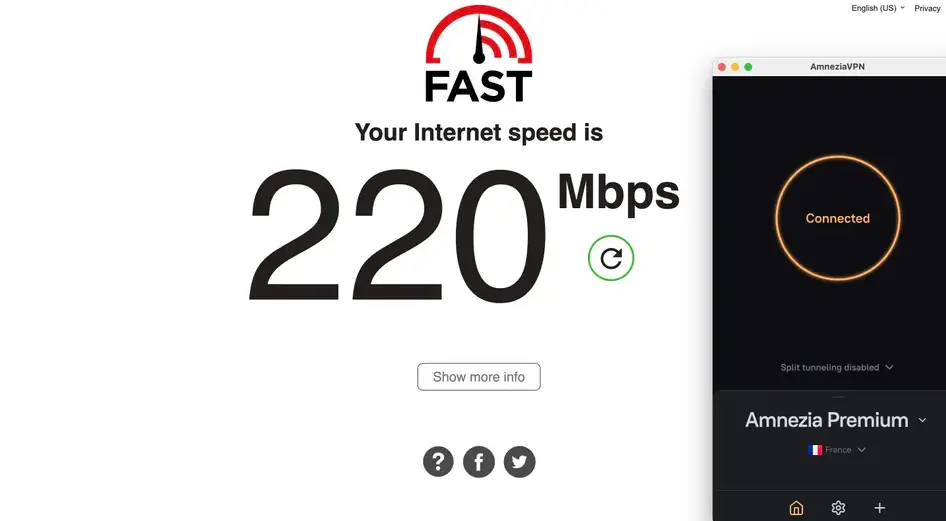
- Streaming and Speed: The service provides stable access to global content (including US Netflix, BBC iPlayer, and 9Now) and offers unlimited traffic with the maximum possible speed — up to 200–220 Mbps.
- Coverage and Devices: Applications are available on all popular platforms (Windows, macOS, iOS, Android, Linux), and one subscription allows connecting up to 7 devices simultaneously, including Android TV and routers.
- Protocols: Modern AmneziaWG and XRay VLESS Reality are used.
- Support: 24/7 round-the-clock help service.
Amnezia Free
A special solution for residents of countries with high levels of internet censorship. This is an absolutely free VPN created to provide access to socially important resources.
- Access: Allows the use of popular social networks (Instagram, Facebook, X). The VPN turns on only for specific blocked resources. All other traffic goes directly (Split Tunneling).
- Simplicity and Anonymity: No registration required, completely ad-free.
- Limitations: Location selection is unavailable (region is assigned automatically), speed is limited to 8 Mbps. Operates based on the AmneziaWG protocol.
- Geography: Focused on Russia, Iran, Myanmar, Turkey, Brazil, and other countries.
Comparison of Amnezia Free and Amnezia Premium
| Feature | Amnezia Free | Amnezia Premium |
| Registration | Not required | Subscription required |
| Ads | None | None |
| Traffic | Selective (Split) | All device traffic |
| Speed | Up to 8 Mbps | Up to 200+ Mbps |
| Streaming | No | Yes (Netflix, iPlayer, etc.) |
| Number of devices | 1 | 7 |
Amnezia Self-hosted
A unique offer for those who want 100% control over their data. This is a service for the automatic creation of your own VPN on your personal server (VPS).
- Technological diversity: Support for 8 different protocols, including advanced AmneziaWG and Xray.
- Functionality: Availability of Split Tunneling and KillSwitch functions.
- Privacy: The server belongs to you; only you have access to the traffic.
Amnezia Business & Hosting
A professional solution for the corporate segment. Suitable for small teams that need stable VPN access without advanced resource requirements. $8 per month, per user, with a minimum of 20 users. Available in 4 locations across the USA, Asia, and Europe.
Business:
- Ready-made solution for organizations.
- Secure remote access to work resources.
- Convenient management of employee connections.
Hosting:
- Optimized server capacities.
- Fast deployment of the Amnezia Self-hosted version.
- No need to search for third-party hosting providers.
Technological Superiority and Bypassing Blocks
Amnezia focuses on countering DPI (Deep Packet Inspection) systems. At its core lies the AmneziaWG protocol — a modification of WireGuard with enhanced obfuscation.
Additionally, XRay VLESS Reality is used, which masks the VPN connection as regular HTTPS traffic, imitating a visit to allowed websites. The team deliberately moved away from outdated solutions like OpenVPN over Cloak and Shadowsocks in favor of more resilient options.
Key safety aspects:
- Encryption: Modern ChaCha20 standard.
- DNS Leak Protection: Protection against DNS leaks.
- Kill Switch: Blocks the internet if the VPN connection is lost.
Important: The interface is minimalistic, but to change servers, you must first disconnect from the current connection. Sorting the country list is currently unavailable in the present versions.
Security Proven by Time
- Open Source: Source code is available on GitHub.
- Independent Audit: In 2022 and 2024, the service successfully passed security audits by the company 7ASecurity.
Amnezia VPN is a powerful ally in the fight for a free internet, offering both simple free tools and advanced solutions for complete anonymity.
Step 1: Server Preparation
For stable operation and minimal resource consumption, we recommend using Ubuntu 22.04 or 24.04 OS.
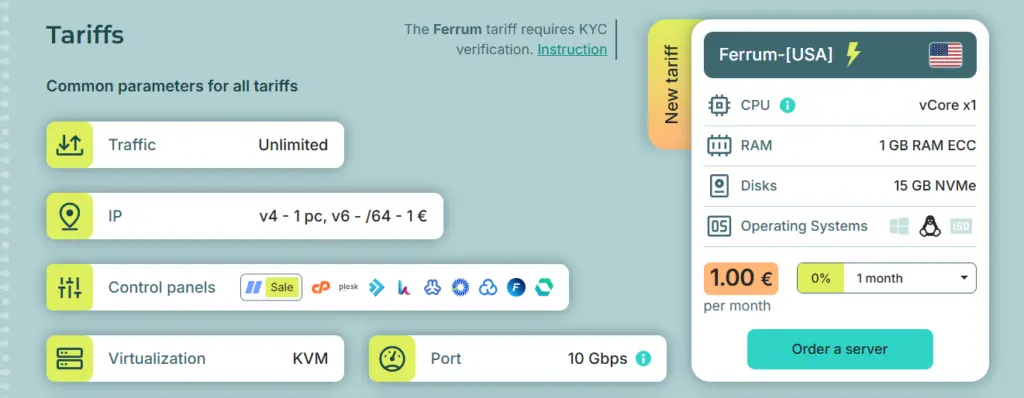
- Go to the hosting provider’s website THE.Hosting (review and plan selection).
- Order the minimum plan in the USA location (usually these are plans from the “Ferrum” line for 1 euro or promotional offers).
- After payment, you will receive access data via email: server IP address, login (usually root), and password.
Step 2: Amnezia VPN Client Installation
Unlike classic solutions, Amnezia is installed on your computer rather than the server, and from there, it “deploys” the necessary scripts to the VPS.
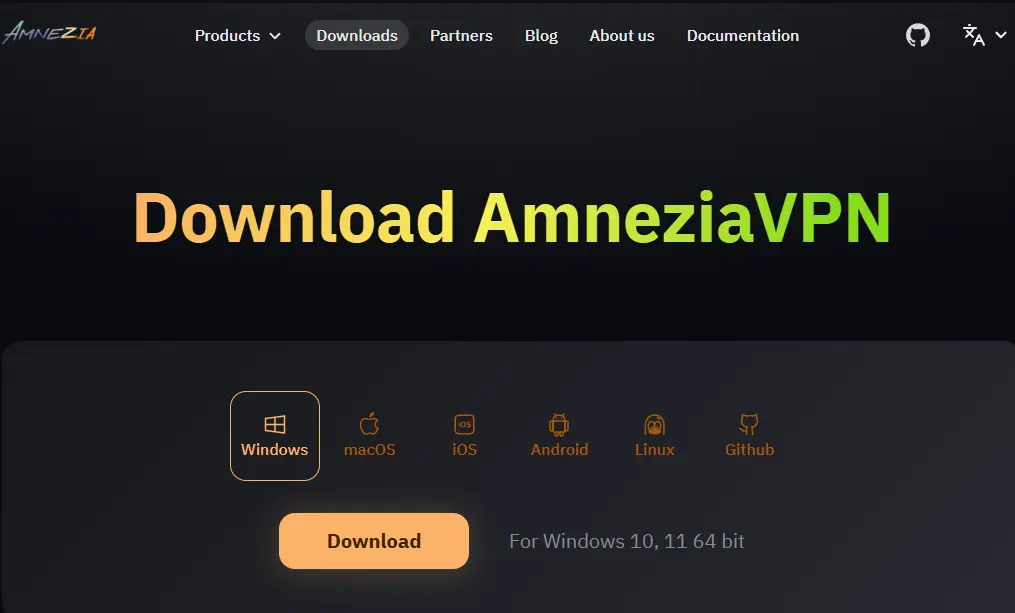
- Download the current version of the application from the official website for your OS (Windows, macOS, or Linux).
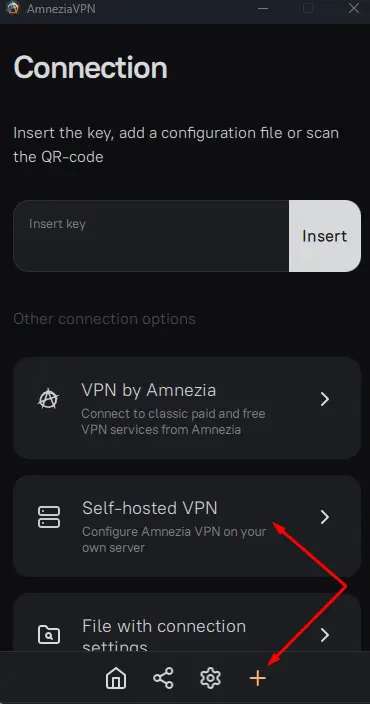
- Launch the application. On the main screen, select the option “I have connection data”, and then — “Configure your server”.
Step 3: Setup and Protocols
At this stage, the application will request your VPS data:
- Enter the IP address, username (root), and password.
- Choose the level of control. For maximum effectiveness in bypassing blocks, we recommend choosing AmneziaWG (modified WireGuard) or XRay VLESS Reality.
- Click the “Install” button.
The process is automated and takes 2–4 minutes. The application will install the necessary containers and configure firewall rules by itself.
Step 4: Verification and Use
After the installation is complete, a “Connect” button will appear in the application.
- Click it and wait for the status to change to “Protected”.
- Check your new IP (it should correspond to the location of your VPS in the USA).
- In the application settings, you can enable the Kill Switch (enabled by default) to prevent traffic from “leaking” if the connection drops.
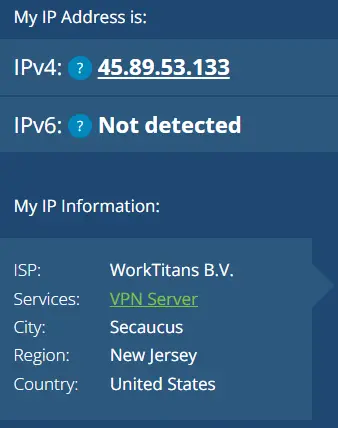
Result: You have obtained a professional Self-hosted VPN with minimal costs (1 euro/month) and without the need for deep Linux system administration.
Conclusion
Amnezia VPN is perhaps the most effective way to “land” high-end security technologies onto budget infrastructure. Using the Self-hosted version on a 1-euro VPS provides a degree of independence and connection quality that is impossible to find in free public services. With minimal administration effort, you get a clean IP address, high speeds, and the confidence that your data is not being analyzed by third parties.

