The WinUSB fork we covered a while back was renamed to WoeUSB recently, while also seeing quite a few releases for the past few days.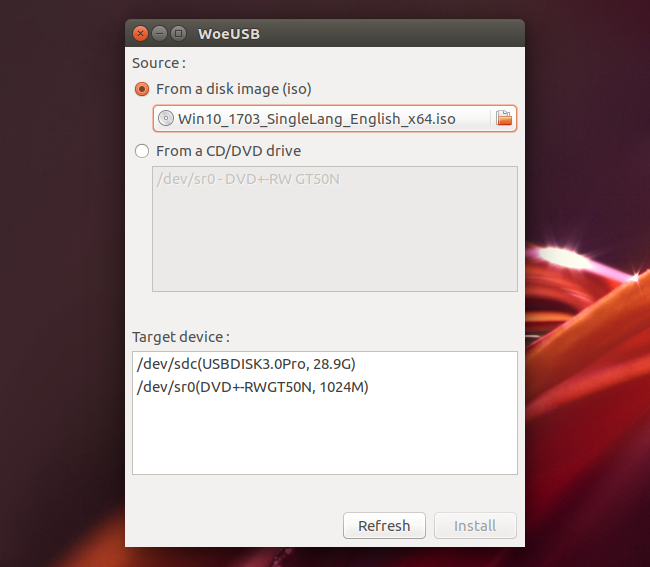
WoeUSB / WinUSB is a tool that can be used to create a bootable Windows installer USB stick from an ISO or DVD. The application supports Windows Vista, Windows 7, Windows 8, as well Windows 10, and can be used either with a GUI or from the command line.
As for supported bootmodes, WoeUSB / WinUSB can create a bootable Windows USB installation stick using the following:
- Legacy / MBR-style / IBM PC compatible bootmode;
- Native UEFI booting is supported for Windows 7 and later images (with a limitation: only FAT filesystem can be used as the target filesystem).
Since it was forked from Colin Gille's WinUSB, the application has seen a major code refactoring, bug fixes as well as some minor new features. The changes include:
- support for both wxWidgets 2 and 3;
- use pkexec instead of gksudo for privilege escalation;
- UEFI boot support;
- numerous bug fixes.
Some newer WoeUSB changes include:
- support customizing the —label of the newly created filesystem in —format mode;
- implement checking on target filesystem in —install mode;
- command line: check if target media is busy before continuing and bail out when the target partition is mounted;
- support Linux distributions that uses "grub2" as prefix name, such as Fedora;
- —install and —format installation options are deprecated in favor of —partition and —device, to be more clear what both options will do. The old options will still be available until WoeUSB v3.0;
- from now on, GRUB will pause when the ENTER key is used before starting to load Windows. This is useful if you want to see if there are errors in the GRUB loading stage.
Also, since the application name has changed, the executables have changed as well: "woeusbgui" for the GUI and "woeusb" for the command line tool.
You can see what's new in each new WoeUSB release (there were 13 new releases for the past 2 days) on GitHub.
Despite the major code refactoring and numerous bug fixes, I still encountered an error using the WoeUSB GUI, which I also found in the original WinUSB. When the Windows USB stick is completed, WoeUSB displayed the following message: "Installation failed ! Exit code: 256". This bug was closed on GitHub and it looks like it doesn't affect the actual Windows USB stick in any way.
In my test, I was able to install Windows 10 64bit in VirtualBox (on an Ubuntu 17.04 host) despite this error.
Install WoeUSB in Ubuntu or Linux Mint via PPA
WoeUSB is available in the main WebUpd8 PPA, for Ubuntu 17.04, 16.10, 16.04 or 14.04 / Linux Mint 18.x or 17.x. To add the PPA and install WoeUSB, use the following commands:
sudo add-apt-repository ppa:nilarimogard/webupd8
sudo apt update
sudo apt install woeusb
If you don't want to add the PPA, you can grab the latest WoeUSB deb from HERE (you'll only need the "woeusb" deb; the "winusb" deb is there as a transitional dummy package, so those that had the old fork installed will receive the new WoeUSB package as an update).
For how to build WoeUSB from source, report bugs, etc., see its GitHub page.
Originally published at WebUpd8: Daily Ubuntu / Linux news and application reviews.
 Top Temporary VPS for Testing & Experiments (2026)
Need a fast cloud server for a few hours or days? Deploy an isolated testing environment, run your scripts, and destroy it without any monthly commitments. Secure payments via Crypto (USDT) & PayPal supported.
• Exclusive Welcome Bonus: Get an extra 15% on your first balance top-up within 24 hours after registration.
• Best-in-class Storage VDS configurations with huge disk space for heavy data testing.
• High-speed hardware platform with a stable presence in the Netherlands (Europe).