When it comes to document management on Linux, you don’t always need a massive office suite like LibreOffice or an expensive subscription service. Sometimes, the best tool is one that does exactly what you need without any extra weight. PDFarranger is the perfect example of this “Unix philosophy” in action.
What is PDFarranger?
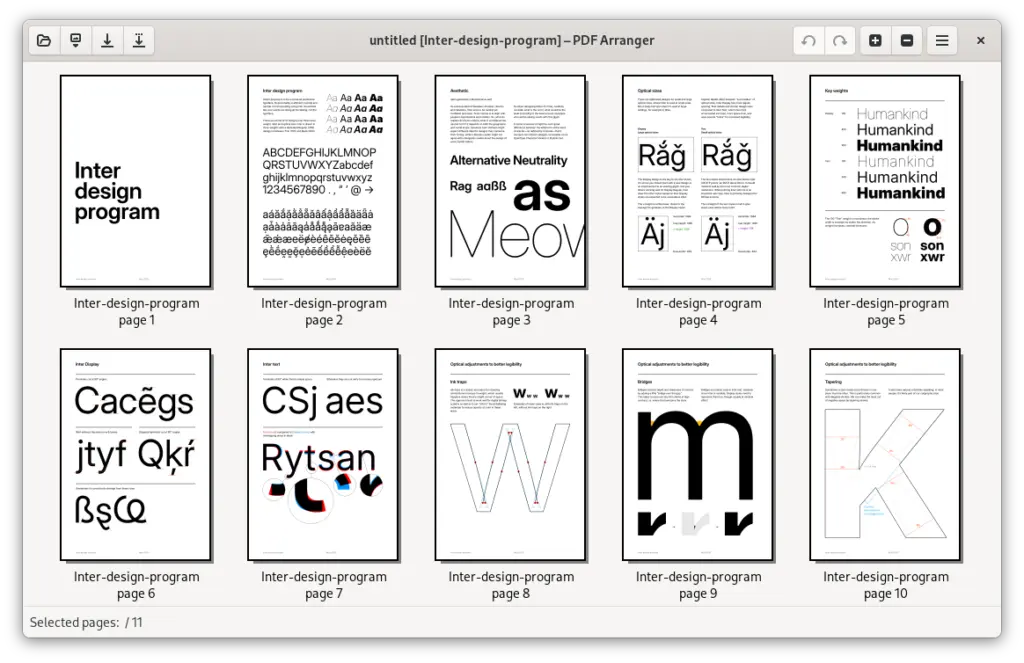
PDFarranger is a lightweight, GTK-based utility designed for one specific purpose: interactive PDF manipulation. It allows users to manage PDF documents at the page level through an intuitive graphical interface.
Whether you are a student organizing research papers or a professional preparing a classroom presentation, PDFarranger makes the process seamless.
Core Features
- Merge & Combine: Drag several PDF files into the window and save them as a single document.
- Page Management: Easily delete unnecessary pages, duplicate important ones, or reorder them using simple drag-and-drop.
- Visual Editing: Rotate pages that were scanned upside down or crop margins to focus on specific content.
- Privacy by Design: Unlike online PDF editors, PDFarranger works entirely offline. Your sensitive documents never leave your local machine.
Why Professionals Choose PDFarranger
Even with the rise of AI-driven document editors, PDFarranger remains a staple in the Linux ecosystem. It has been a recommended tool for years—widely cited by educators and developers (including those on platforms like LinuxFr) for its stability and efficiency.
In 2026, it continues to be the “go-to” choice for:
- Speed: It opens instantly and processes even large files without lag.
- Simplicity: No complex menus or “Pro” subscriptions. Everything is visible on the main screen.
- Low Resource Usage: It runs perfectly on everything from high-end workstations to older laptops running Ubuntu or Fedora.
Installation Guide
PDFarranger is available in the official repositories of almost every Linux distribution.
| Distribution | Installation Command |
| Ubuntu / Debian / Mint | sudo apt install pdfarranger |
| Fedora | sudo dnf install pdfarranger |
| Arch Linux | sudo pacman -S pdfarranger |
| Flatpak (Universal) | flatpak install flathub com.github.jeromerobert.pdfarranger |
How to Use It
- Open PDFarranger from your application menu.
- Drag and drop one or more PDF files into the workspace.
- Right-click on a page thumbnail to rotate or delete it.
- Drag thumbnails to change the page order.
- Go to File > Save to export your new document.
Summary
PDFarranger is a testament to the power of open-source software: a tool that was excellent in 2018, refined by 2022, and remains essential in 2026. If you value privacy, speed, and a clean interface, this is the only PDF manipulation tool you really need.
 Top Temporary VPS for Testing & Experiments (2026)
Need a fast cloud server for a few hours or days? Deploy an isolated testing environment, run your scripts, and destroy it without any monthly commitments. Secure payments via Crypto (USDT) & PayPal supported.
• Exclusive Welcome Bonus: Get an extra 15% on your first balance top-up within 24 hours after registration.
• Best-in-class Storage VDS configurations with huge disk space for heavy data testing.
• High-speed hardware platform with a stable presence in the Netherlands (Europe).